Showing posts with label twitter. Show all posts

Saturday, December 7, 2019

The 11 Best Social Media Dashboard Tools & Apps

When implementing your social media strategy, it's easy to realize that manually posting on multiple different websites, multiple times a day, isn't optimal for your busy schedule. But it's not easy to tell from a baseline or pricing page which tools are not only the best for efficiency but best for your business.

Instead of spending hours of extra research combing through all of your options and sitting through countless demos and free trials, we've compiled a list of the best social media dashboards that fit your budget and brand.

These social media dashboards are optimized for every type of SMB; whether you're a social media team or a party of one, these apps will help you accomplish your goals in a streamlined, efficient way.

1. Later Price: $9, $19, $29, $49 per month, and enterprise pricingWhy it's great: Instagram scheduling

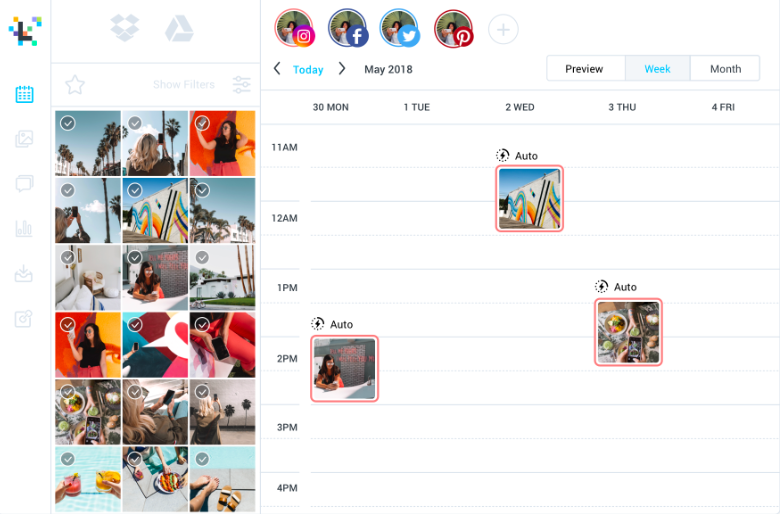
While you can connect Facebook, Twitter, and Pinterest profiles, Later is best for Instagram scheduling. This is because of its image-based content calendar scheduling, so you can see a bird's eye view of your brand in a monthly, visual format.
later%20scheduling%20example.png?width=780&name=later%20scheduling%20example.png

Image Source

Later is also an Instagram partner, which means it integrates with Instagram's API. This partnership means your account information will stay completely safe, which is important for Instagram Business accounts that have Shopping set up.

2. Sendible Price: $29, $99, $199, $299 per monthWhy it's great: Agency-based management

Are you a social media or marketing agency? Sendible may be the answer to unkempt management: it's a tool fit for an agency with clients. It helps you streamline how you manage brands and offers a couple unique features that help you succeed.
sendible%20report%20example.png?width=1030&name=sendible%20report%20example.png

Image Source

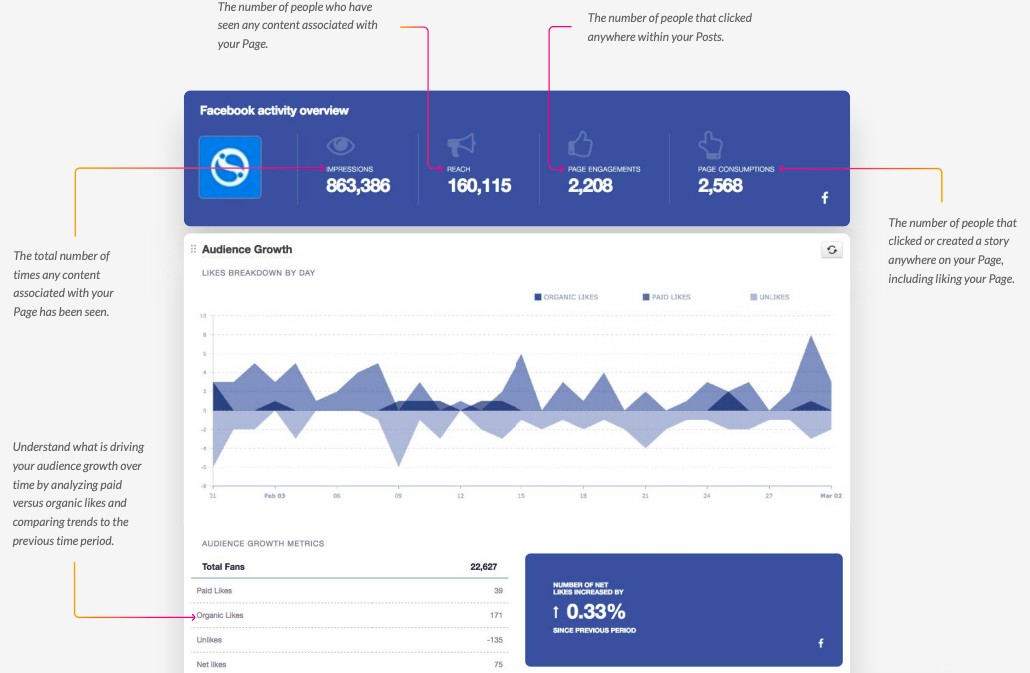
Sendible has a royalty-free image search tool and a Canva integration. Sendible also has social listening tools, a Reports function, scheduling, and post previews. To put it simply: this is a full dashboard and suite of tools to put your client accounts all in one place.

3. Tailwind Price: $9.99, $799.99 per month, and enterprise pricingWhy it's great: Pinterest and Instagram management

Tailwind is a very unique program, providing services for two apps normally not paired with each other: Pinterest and Instagram. It makes sense, however, considering both apps focus on visual multimedia. Offering a full media dashboard with scheduling, social listening, and analytics tools, Tailwind also has a few interesting program-specific services.
tailwind%20report%20example.png?width=697&name=tailwind%20report%20example.png

Image Source

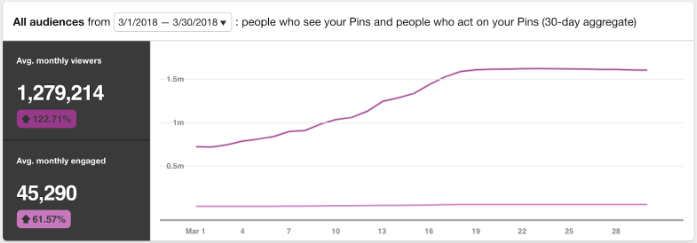
First, it gives suggestions about how to improve Instagram and Pinterest performance. It also comes with a way to promote Pinterest content and manage Instagram user-generated content. If your brand is heavily focused on visuals, Tailwind may be right for you.

4. Sprout Social Price: $99, $149, and $249 per user per monthWhy it's great: Team-based management

Sprout Social is a dashboard platform that's focused entirely on social media teams. What you get for your money is a full suite of tools, including options that allow you to create and schedule posts, social listening tools, and most of all: analytic data.
sprout%20social%20report%20example.png?width=782&name=sprout%20social%20report%20example.png

Image Source

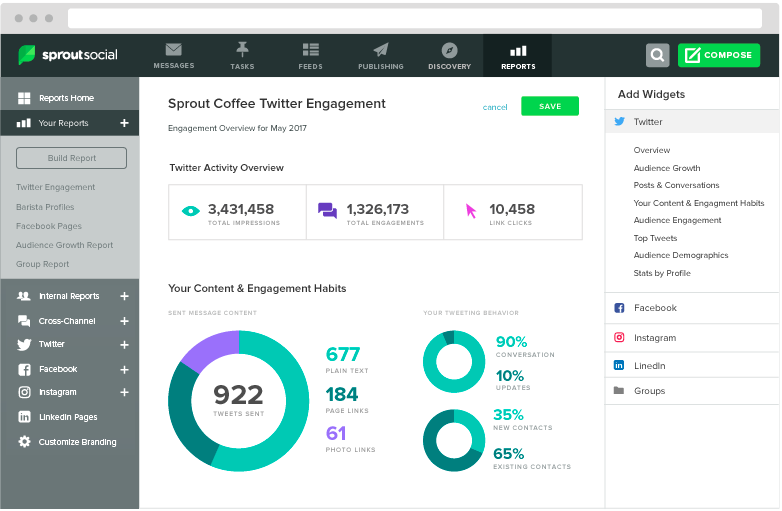
The analytic tools are the shining star of Sprout Social. Expansive, in-depth reporting is available. If that's a focus for your brand, consider Sprout. They make the reports so professional and easy to read, there's no editing required.

5. MeetEdgar Price: $49/monthWhy it's great: 100% automated scheduling

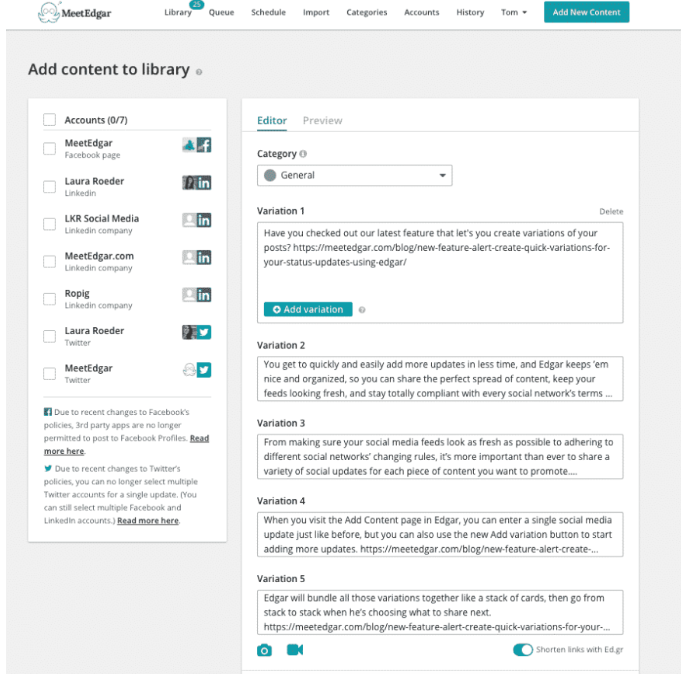
MeetEdgar is an app with a different approach to social media management, is. All users do is upload categorically-based content into their account and create time slots for when they want their account to post said content.
meetedgar%20category%20example.png?width=681&name=meetedgar%20category%20example.png

Image Source

Then, according to the time slots and categories, the app will schedule and upload content. If you want your Twitter account to post a meme at 11 AM on a Thursday, MeetEdgar would search through the "Meme" category of content you've already uploaded, schedule, and post it.

Managers might like this option, if they don't have enough time to constantly schedule and upload content. They can plug in their entire content calendar at the start of the month and remove the heavy lifting for the next few weeks.

Post-enhancing dashboards such as these three can take care of your social strategy without losing any of quality.

1. TweetDeck Price: FreeWhy it's great: Twitter dash management

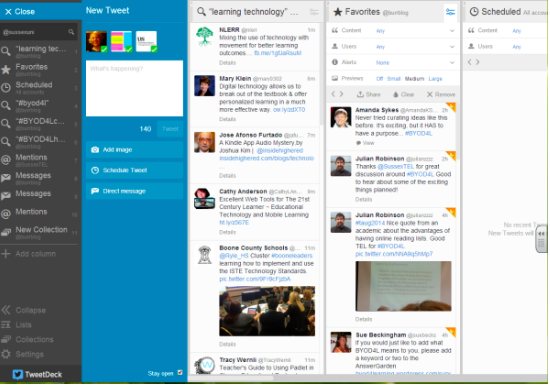
TweetDeck is amazing if you're tired of flipping back and forth through the different tabs on Twitter. It’s a free extension of twitter (no download required) that automatically gives you your account's Home, Notifications, Trending, and Messages in a dashboard view.
tweetdeck%20dsahboard%20example.png?width=550&name=tweetdeck%20dsahboard%20example.png

Image Source

This app is especially handy for posting quickly. You can engage with your Twitter in-app, and it feels like a much faster method of running your account than the in-browser functionality . Plus, TweetDeck automatically updates with any new notifications.

2. HubSpot Price: Free plan, or $50, $800, $3200/monthWhy it's great: All-in-one social media software

With HubSpot's social media management tool, you get an all-inclusive package. Connect up to 300 accounts and schedule up to 10,000 posts a month. Plus, for super in-depth planners, you can schedule posts up to 3 years in advance.
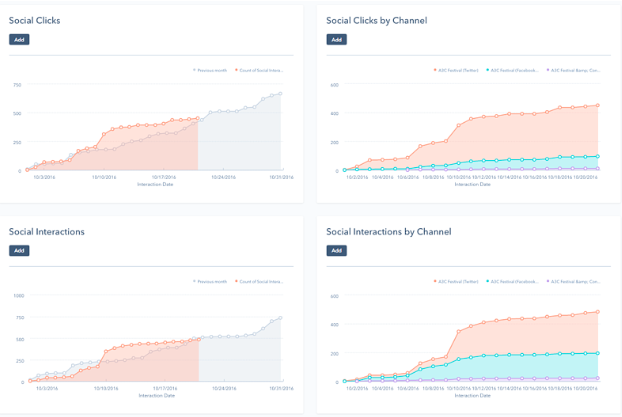
hubspot%20social%20media%20analytics%20example.png?width=622&name=hubspot%20social%20media%20analytics%20example.pngHubSpot's social media management features include monitoring mentions and engagement, and provides full analytic reports. You're able to schedule posts all in one place, without leaving the system.

3. TweetStats Price: FreeWhy it's great: Free basic Twitter analytics

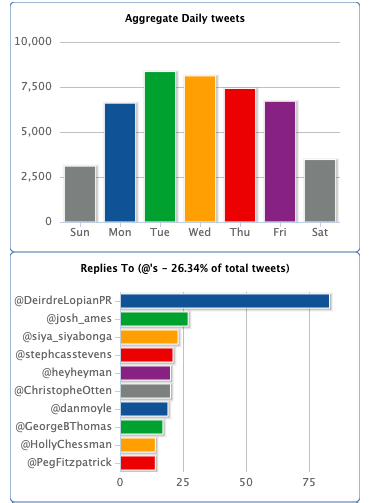
This little website is super handy if you don't have the budget to pay for analytic tools. TweetStats can give you the analytics of any Twitter account in about two minutes. The website displays graphs of when you've tweeted, the volume of tweets, time you usually tweet, and your most used words and hashtags.
tweetstats%20analytics%20example.png?width=370&name=tweetstats%20analytics%20example.png

Image Source

Using TweetStats is especially helpful if you want to view the ecosystem of your Twitter. Are you staying on-brand? Are you meeting your tweet goals? What hashtags can you elevate the use of?

4. TubeBuddy Price: Free plan, or $9, $19, $49 per month Why it's great: YouTube management

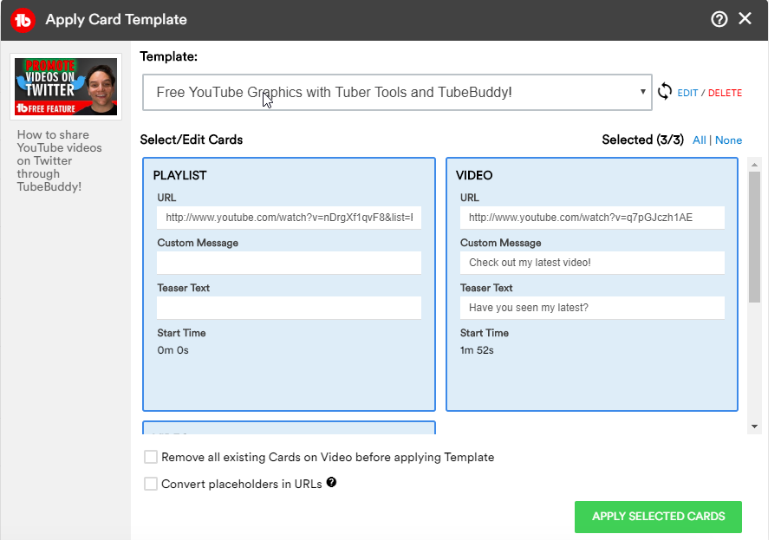
If you have a large YouTube presence, consider TubeBuddy. TubeBuddy offers a hefty suite of perks to present a full dashboard. Categories include video dashboard, video SEO, bulk processing, promotion, data & research, and productivity.
tubebuddy%20card%20template.png?width=769&name=tubebuddy%20card%20template.png

Image Source

The screenshot above features one of TubeBuddy's card template features. Card templates streamline the process of uploading and finalizing YouTube videos, making it easier to sort videos into a playlist on your channel.

You can install the program for free on Chrome, working sort of like an extension. The free plan gives you access to analytics, productivity, and SEO tools to get started. TubeBuddy is also a YouTube Partner and integrates with Alexa.

5. MavSocial Price: Free plan, or $19, $78, $199, $499 per month Why it's great: Visual-based streamlined management

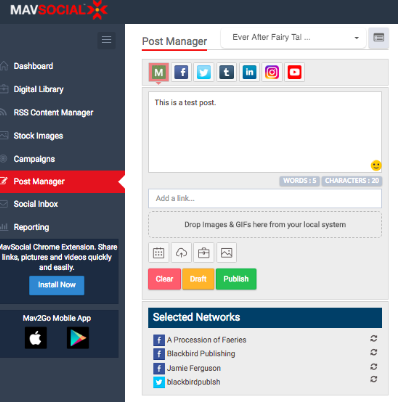
This is a great post-enhancing tool. MavSocial has a focus on visual-based management, and as such, offers unique perks, like editing multimedia content and a stock photo digital library. With the editing tools, you can add filters to your photos, crop, and search for royalty-free images.
mavsocial%20dashboard%20example.png?width=400&name=mavsocial%20dashboard%20example.png

Image Source

On top of all of this, MavSocial has a full dashboard suite, meaning you can schedule content and engage with followers. MavSocial supports YouTube, Facebook, Twitter, and Instagram. The app is also an Instagram Partner.

6. Hootsuite Price: Free plan, $29, $129, $599 per monthWhy it's great: All-in-one social media management

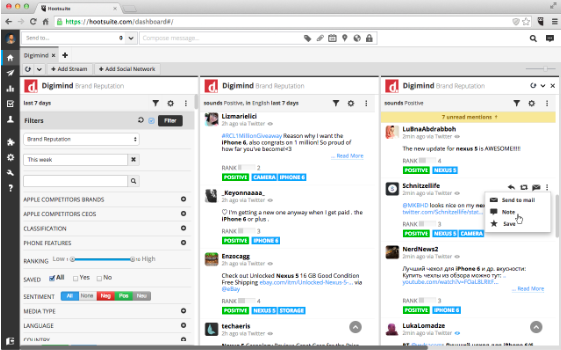
Hootsuite is a popular social media tool and boasts over 15 million users. The free plan lets you add three social accounts from different platforms on one screen and has a limit on how many posts are available to make.
hootsuite%20dashboard%20example.png?width=561&name=hootsuite%20dashboard%20example.png

Image Source

While user-friendly, Hootsuite is an expansive app. You can create ads, running an ROI report on those ads, and also has options to schedule and create posts. Note that you can only post on your Instagram using the scheduler, if you have an Instagram Business account.

Every business is unique, and so is every social media dashboard. Because of that, finding the best fit can be daunting. Covering all your bases can be simplified with a social media dashboard, as well as building a community and social presence.

If you want to take a crack at building your own content calendar that'll help you plan your social media posts, check out our article here.

__ptq.gif?a=53&k=14&r=https%3A%2F%2Fblog.hubspot.com%2Fmarketing%2Fsocial-media-dashboard-tools&bu=https%253A%252F%252Fblog.hubspot.com%252Fmarketing&bvt=rss

Read more: blog.hubspot.com

https://infoforu.org/the-11-best-social-media-dashboard-tools-apps-2/

The 11 Best Social Media Dashboard Tools & Apps

When implementing your social media strategy, it's easy to realize that manually posting on multiple different websites, multiple times a day, isn't optimal for your busy schedule. But it's not easy to tell from a baseline or pricing page which tools are not only the best for efficiency but best for your business.

Instead of spending hours of extra research combing through all of your options and sitting through countless demos and free trials, we've compiled a list of the best social media dashboards that fit your budget and brand.

These social media dashboards are optimized for every type of SMB; whether you're a social media team or a party of one, these apps will help you accomplish your goals in a streamlined, efficient way.

1. Later Price: $9, $19, $29, $49 per month, and enterprise pricingWhy it's great: Instagram scheduling

While you can connect Facebook, Twitter, and Pinterest profiles, Later is best for Instagram scheduling. This is because of its image-based content calendar scheduling, so you can see a bird's eye view of your brand in a monthly, visual format.

later%20scheduling%20example.png?width=780&name=later%20scheduling%20example.png

Image Source

Later is also an Instagram partner, which means it integrates with Instagram's API. This partnership means your account information will stay completely safe, which is important for Instagram Business accounts that have Shopping set up.

2. Sendible Price: $29, $99, $199, $299 per monthWhy it's great: Agency-based management

Are you a social media or marketing agency? Sendible may be the answer to unkempt management: it's a tool fit for an agency with clients. It helps you streamline how you manage brands and offers a couple unique features that help you succeed.

sendible%20report%20example.png?width=1030&name=sendible%20report%20example.png

Image Source

Sendible has a royalty-free image search tool and a Canva integration. Sendible also has social listening tools, a Reports function, scheduling, and post previews. To put it simply: this is a full dashboard and suite of tools to put your client accounts all in one place.

3. Tailwind Price: $9.99, $799.99 per month, and enterprise pricingWhy it's great: Pinterest and Instagram management

Tailwind is a very unique program, providing services for two apps normally not paired with each other: Pinterest and Instagram. It makes sense, however, considering both apps focus on visual multimedia. Offering a full media dashboard with scheduling, social listening, and analytics tools, Tailwind also has a few interesting program-specific services.

tailwind%20report%20example.png?width=697&name=tailwind%20report%20example.png

Image Source

First, it gives suggestions about how to improve Instagram and Pinterest performance. It also comes with a way to promote Pinterest content and manage Instagram user-generated content. If your brand is heavily focused on visuals, Tailwind may be right for you.

4. Sprout Social Price: $99, $149, and $249 per user per monthWhy it's great: Team-based management

Sprout Social is a dashboard platform that's focused entirely on social media teams. What you get for your money is a full suite of tools, including options that allow you to create and schedule posts, social listening tools, and most of all: analytic data.

sprout%20social%20report%20example.png?width=782&name=sprout%20social%20report%20example.png

Image Source

The analytic tools are the shining star of Sprout Social. Expansive, in-depth reporting is available. If that's a focus for your brand, consider Sprout. They make the reports so professional and easy to read, there's no editing required.

5. MeetEdgar Price: $49/monthWhy it's great: 100% automated scheduling

MeetEdgar is an app with a different approach to social media management, is. All users do is upload categorically-based content into their account and create time slots for when they want their account to post said content.

meetedgar%20category%20example.png?width=681&name=meetedgar%20category%20example.png

Image Source

Then, according to the time slots and categories, the app will schedule and upload content. If you want your Twitter account to post a meme at 11 AM on a Thursday, MeetEdgar would search through the "Meme" category of content you've already uploaded, schedule, and post it.

Managers might like this option, if they don't have enough time to constantly schedule and upload content. They can plug in their entire content calendar at the start of the month and remove the heavy lifting for the next few weeks.

Post-enhancing dashboards such as these three can take care of your social strategy without losing any of quality.

1. TweetDeck Price: FreeWhy it's great: Twitter dash management

TweetDeck is amazing if you're tired of flipping back and forth through the different tabs on Twitter. It’s a free extension of twitter (no download required) that automatically gives you your account's Home, Notifications, Trending, and Messages in a dashboard view.

tweetdeck%20dsahboard%20example.png?width=550&name=tweetdeck%20dsahboard%20example.png

Image Source

This app is especially handy for posting quickly. You can engage with your Twitter in-app, and it feels like a much faster method of running your account than the in-browser functionality . Plus, TweetDeck automatically updates with any new notifications.

2. HubSpot Price: Free plan, or $50, $800, $3200/monthWhy it's great: All-in-one social media software

With HubSpot's social media management tool, you get an all-inclusive package. Connect up to 300 accounts and schedule up to 10,000 posts a month. Plus, for super in-depth planners, you can schedule posts up to 3 years in advance.

hubspot%20social%20media%20analytics%20example.png?width=622&name=hubspot%20social%20media%20analytics%20example.pngHubSpot's social media management features include monitoring mentions and engagement, and provides full analytic reports. You're able to schedule posts all in one place, without leaving the system.

3. TweetStats Price: FreeWhy it's great: Free basic Twitter analytics

This little website is super handy if you don't have the budget to pay for analytic tools. TweetStats can give you the analytics of any Twitter account in about two minutes. The website displays graphs of when you've tweeted, the volume of tweets, time you usually tweet, and your most used words and hashtags.

tweetstats%20analytics%20example.png?width=370&name=tweetstats%20analytics%20example.png

Image Source

Using TweetStats is especially helpful if you want to view the ecosystem of your Twitter. Are you staying on-brand? Are you meeting your tweet goals? What hashtags can you elevate the use of?

4. TubeBuddy Price: Free plan, or $9, $19, $49 per month Why it's great: YouTube management

If you have a large YouTube presence, consider TubeBuddy. TubeBuddy offers a hefty suite of perks to present a full dashboard. Categories include video dashboard, video SEO, bulk processing, promotion, data & research, and productivity.

tubebuddy%20card%20template.png?width=769&name=tubebuddy%20card%20template.png

Image Source

The screenshot above features one of TubeBuddy's card template features. Card templates streamline the process of uploading and finalizing YouTube videos, making it easier to sort videos into a playlist on your channel.

You can install the program for free on Chrome, working sort of like an extension. The free plan gives you access to analytics, productivity, and SEO tools to get started. TubeBuddy is also a YouTube Partner and integrates with Alexa.

5. MavSocial Price: Free plan, or $19, $78, $199, $499 per month Why it's great: Visual-based streamlined management

This is a great post-enhancing tool. MavSocial has a focus on visual-based management, and as such, offers unique perks, like editing multimedia content and a stock photo digital library. With the editing tools, you can add filters to your photos, crop, and search for royalty-free images.

mavsocial%20dashboard%20example.png?width=400&name=mavsocial%20dashboard%20example.png

Image Source

On top of all of this, MavSocial has a full dashboard suite, meaning you can schedule content and engage with followers. MavSocial supports YouTube, Facebook, Twitter, and Instagram. The app is also an Instagram Partner.

6. Hootsuite Price: Free plan, $29, $129, $599 per monthWhy it's great: All-in-one social media management

Hootsuite is a popular social media tool and boasts over 15 million users. The free plan lets you add three social accounts from different platforms on one screen and has a limit on how many posts are available to make.

hootsuite%20dashboard%20example.png?width=561&name=hootsuite%20dashboard%20example.png

Image Source

While user-friendly, Hootsuite is an expansive app. You can create ads, running an ROI report on those ads, and also has options to schedule and create posts. Note that you can only post on your Instagram using the scheduler, if you have an Instagram Business account.

Every business is unique, and so is every social media dashboard. Because of that, finding the best fit can be daunting. Covering all your bases can be simplified with a social media dashboard, as well as building a community and social presence.

If you want to take a crack at building your own content calendar that'll help you plan your social media posts, check out our article here.

__ptq.gif?a=53&k=14&r=https%3A%2F%2Fblog.hubspot.com%2Fmarketing%2Fsocial-media-dashboard-tools&bu=https%253A%252F%252Fblog.hubspot.com%252Fmarketing&bvt=rss

Read more: blog.hubspot.com

https://infoforu.org/the-11-best-social-media-dashboard-tools-apps/

Saturday, November 2, 2019

Dad fails to notice Cheez-It planted on wall by daughter for 4 years

cheez-it-wall-1-800x400.jpg

A Twitter user documented her four-year-long experiment of having a Cheez-It planted on a wall in her house to see if her dad ever took notice. Her experiment came to an end on Oct. 6, a day now memorialized in Sara Smith’s Twitter bio.

“rip cheezit. 11/26/2015-10/06/19,” her bio now reads. So what happened? Let’s start at the beginning.

In 2015, Smith pinned a Cheez-It on the wall after being inspired by another Twitter user who did the same thing with a chip. The other user’s dad was seemingly more acute because he noticed the chip within weeks.

Smith tweeted that it had been a few hours, then a few weeks, and then a few months of her dad not noticing his new, crispy cheddar home decor. “Stay tuned to see how long it takes him to notice (it’ll be a long time),” Smith very correctly stated.

so far it's been a few hours. stay tuned to see how long it takes him to notice (it'll be a long time)

— ♡ 。・゚゚✧𝒮・゚゚✧。♡ (@_sarasmithhh) November 27, 2015

@sarasmithh97 day 10 and it is still there, stay tuned to see how much longer it will take my dad to notice it pic.twitter.com/YsdxTS6TlB

— ♡ 。・゚゚✧𝒮・゚゚✧。♡ (@_sarasmithhh) December 7, 2015

@sarasmithh97 day 55, I just got home from being in Texas for 2 weeks yet dad still hasn't noticed it 1f642.pngpic.twitter.com/6GgIJ7yrMr

— ♡ 。・゚゚✧𝒮・゚゚✧。♡ (@_sarasmithhh) January 20, 2016

On day 122, Smith announced that her father rearranged the furniture and obstructed the view to the Cheez-It with a bookcase, prompting Smith to find a new home for it. Somehow, despite moving the bookcase right in front of it, Smith’s father was still unaware of its presence.

@sarasmithh97 idk what day it is im too lazy to figure it out rn but just know its still there my dad hasn't seen it pic.twitter.com/S9MfsN0Kao

— ♡ 。・゚゚✧𝒮・゚゚✧。♡ (@_sarasmithhh) February 11, 2016

day 122, dad rearranged furniture and moved a bookshelf in front of the cheez it so it had to be moved a few feet pic.twitter.com/wbYLayT8w9

— ♡ 。・゚゚✧𝒮・゚゚✧。♡ (@_sarasmithhh) April 3, 2016

Smith then announced that she would be leaving for six months and created a poll on Twitter. “Should I tell him about it now, or leave it he won’t notice?” she questioned. Users overwhelmingly voted for Smith to leave the Cheez-It in its seemingly permanent home.

I fucking forgot that I'm about to leave for like 6 months and my dad still hasn't found the cheezit SOS!!!! should I:

— ♡ 。・゚゚✧𝒮・゚゚✧。♡ (@_sarasmithhh) December 13, 2016

The next update came on day 563 into the experiment, when Smith assured avid followers that she makes sure to replace the Cheez-It every so often because “they get gross and need to be replaced.” She was on Cheez-It number three at the time.

bet y'all forgot about this thing cause i sure did!! day 563!! (except this is actually cheezit #3 bc they get gross & need to be replaced) pic.twitter.com/gDlnozHC6R

— ♡ 。・゚゚✧𝒮・゚゚✧。♡ (@_sarasmithhh) June 11, 2017

Two years later, Smith announced that she had moved out of the house–but not to fret, because her stepmother was in on the Cheez-It stint and was keeping her updated.

this was a conversation with my stepmom on thanksgiving pic.twitter.com/ofD05Z3CVy

— ♡ 。・゚゚✧𝒮・゚゚✧。♡ (@_sarasmithhh) November 26, 2017

Eventually, Smith was practically begging her father to see the Cheez-It. She even gave him a box of Cheez-Its for Christmas as a gag gift. “Day 750. im kind of getting tired of this, i thought he’d notice much sooner. i honestly might put another one somewhere,” Smith tweeted.

i’m giving my dad a box of cheezits as a gag christmas gift since he still has not found the one on the wall 1f607.pngpic.twitter.com/FBbtZTS2NF

— ♡ 。・゚゚✧𝒮・゚゚✧。♡ (@_sarasmithhh) December 23, 2017

Obviously the gift went over his head.

update: dad was very confused. merry cheezmas :)) pic.twitter.com/RiYNyrvKhI

— ♡ 。・゚゚✧𝒮・゚゚✧。♡ (@_sarasmithhh) December 25, 2017

On year three, Smith posted a video of her dad with a notable feature from Mr. Cheez-It III.

you’d think that a cheezit stuck to the green wall above your pet’s tank would grab your attention, but alas..... it has been over 3 years pic.twitter.com/MHFOHlstn0

— ♡ 。・゚゚✧𝒮・゚゚✧。♡ (@_sarasmithhh) December 29, 2018

However, on year four, the gag was up, but not because her dad noticed the Cheez-It. Smith’s brother-in-law spoiled the fun and told her dad. “He’s not going to be punished! lol the internet is harassing him enough,” Smith told the Daily Dot of her brother-in-law.

it is with sadness that i must announce that the gag is up. after 1,410 days - almost 4 years - my brother in law spoiled it for us and mentioned it to my dad 1f623.pnghttps://t.co/jVdFV48eZN

— ♡ 。・゚゚✧𝒮・゚゚✧。♡ (@_sarasmithhh) October 6, 2019

What a fucking narc https://t.co/NcHx1Qt2Ib

— sidknee270c-1f3fd.png (@sbroookz) October 7, 2019

So men really ain't shit https://t.co/csTppYru97

— Lord Nick 1f355.png (@le_nick92) October 7, 2019

“Thank you to everyone who’s supported the cheezit & i through the years, im sorry my naive family didn’t understand that when it rots you simply replace it. i’m just disappointed as you all are,” Smith wrote. “Also i’m SO mad that we will never know just how unobservant my dad is.”

also i’m SO mad that we will never know just how unobservant my dad is

— ♡ 。・゚゚✧𝒮・゚゚✧。♡ (@_sarasmithhh) October 6, 2019

But others assured her that four years was more than enough time to make an assessment on Smith’s observational skills–or lack thereof.

No trust me, 4 years says a whole lot 1f602.png1f923.png

— 2764.pngKing Peddie 1f451.png (@Peddiespice) October 7, 2019

i’d say 1,410 days is enough to conclude that your dads pretty damn unobservant

— timmy curry (@timmycurry_) October 7, 2019

Smith told the Daily Dot that she “did not expect this level of attention at all. It didn’t take off until just now when it ended. Until then, nothing had more than 100 likes, maybe.”

However, “everyone that has followed from the beginning is proud.”

Now, Smith’s Cheez-It challenge is inspiring others to take up the challenge, just like Smith was once inspired. “Issa cheezit challenge!!! lol keep ur eyes peeled it might be happening to u!!” Smith wrote.

i’m rlly sad that it’s the end of an era but it’s also funny to see everyone in my mentions talking about how they’re trying it :,) issa cheezit challenge!!! lol keep ur eyes peeled it might be happening to u!! 1f440.png1f575-1f3fc-200d-2640-fe0f.png1f633.png

— ♡ 。・゚゚✧𝒮・゚゚✧。♡ (@_sarasmithhh) October 8, 2019

READ MORE:

Twitter users are posting photos of their lookalike parents for viral thread Dad surprises daughter with photo evidence that he once dated Salma Hayek Someone recreated the viral pizzadilla recipe—and says it’s just as gross as it looks

The post Dad fails to notice Cheez-It planted on wall by daughter for 4 years appeared first on The Daily Dot.


Read more: dailydot.com

https://infoforu.org/dad-fails-to-notice-cheez-it-planted-on-wall-by-daughter-for-4-years/

Monday, April 29, 2019

Parents Hilarious Reaction As Daughter Pulls ‘Seductive Leg Move’ At Table

parents-262x175.jpgparents-702x369.jpgJam Press

Of all the awkward family meals to ever be tentatively nibbled away at, certain ones will go down in history for their uncomfortable hilarity.

From pent up rivalries spilling out like lumpy gravy, to enough growing tension to slice through the roast; it’s no wonder the family dinner has been a staple of gross-out comedies throughout the decades.

Perhaps one of the most amusing family dinner moments ever caught on camera comes from the Gilmour family from Glasgow, who were dining out at a restaurant when things got awkward.

The footage shows 18-year-old student Lauren lifting her leg seductively as the song Big Spender blasts in the background.

The camera – which was wielded by Lauren’s brother Grant – then swung round to capture their parents’ respective frozen expressions. Dad Alan could be seen clutching at his collar nervously while mum Yvonne looked as if she was genuinely considering grounding Lauren.

Grant later shared the footage on Twitter, writing, ‘When your parents realise they raised a hoe’. His tweet quickly went viral, with people loving the absolute horror written all over the parents’ faces.

spender.jpgJam Press

One person chuckled:

The dads level of awkwardness as he grabs his collar tho!! Lol

Another giggled:

Oh my lord your father looks like it may have a heat attack.

The dads level of awkwardness as he grabs his collar tho!! Lol

— Kym 264f.png2618.png1f1fa-1f1f8.png1f1ee-1f1ea.png (@kimber1114) January 20, 2019

In 2016, a fantastic Reddit thread was born which asked users: ‘What’s the most awkward family dinner you’ve ever had?’ The answers, of course, were priceless.

One person commented:

About an hour into the party, it occurred to me that I needed to use the bathroom. So I went to the bathroom. During that time, I decided to take advantage of the privacy (naturally) by having a quick circle-jerk to a bit of porn.

Now, my grandfather had this Bluetooth earpiece that had voice-command and I thought it was a pretty cool device (until this moment, that is). Now, being the dumb shit I was, I forgot to turn off Bluetooth on my phone.

Surprisingly enough, the phone detected my grandpa’s earpiece and automatically paired with it. Meaning the sounds of moans and sex noises from my phone were now being broadcast to my grandpa’s ear. When I was done, I washed my hands, and walked back to the dinner table to find my grandpa trying real hard to contain his laughter.

I asked him what was so funny, and he replied, ‘Having a little alone time, now, weren’t you?’. It was at this point I knew I fucked up, and no one said a word for the rest of the dinner. It was extremely embarrassing, and to this day, I’m still scared to use my phone whenever my grandpa’s around. (He still hasn’t gotten rid of that damned thing).

Oh my lord your father looks like it may have a heat attack1f923.png1f923.png1f923.png@laurengilmourr_ you will now be written out the will 1f923.png1f923.png1f923.png

— Dawn Armstrong (@armstrongdawn24) January 20, 2019

Another red-faced Redditer shared:

One time in school someone talked about masturbating, and I was 10 years old at the time. I didn’t know what it was. So I asked my mom, and she joked about it, not even telling me. Then all the adults started joking and telling stories.

Some were stories I didn’t need (or want) to hear, so I just sat at the table, trying not to eavesdrop. My siblings, I don’t know about them. They were in their own little world. That was one of the most awkward family dinner I ever had.

@abbiescott_12 the song in the background

— leah 1f9da-1f3fc-200d-2640-fe0f.png (@leahmclarkx) January 20, 2019

Seriously though, anyone else actually extremely impressed by Lauren’s flexibility? Some serious gymnast skills going on there. Her parents should be proud!

If you have a story you want to tell send it to UNILAD via stories@unilad.co.uk


Read more: unilad.co.uk

https://infoforu.org/parents-hilarious-reaction-as-daughter-pulls-seductive-leg-move-at-table/